
SMTP2GO Review 2026:
Is This Email Delivery Service
Right for You?
SMTP2GO has operated for two decades as a dedicated SMTP relay, handling the technical work of getting emails into inboxes.
With over 35,000 customers in 130+ countries, a Stevie Award-winning support team, and five consecutive Deloitte Technology Fast 500 Asia/Pacific appearances, it has earned its reputation as a reliable email delivery service for transactional and operational email.

Table of contents
To write this SMTP2GO review, we analyzed it extensively.
We believe it’s the right choice if:
- You need an SMTP relay for transactional emails (password resets, order confirmations, system alerts)
- You want a managed service that handles SPF, DKIM, and IP reputation for you
- You value responsive, human support available around the clock
- You’re an MSP or agency managing email delivery for multiple clients
- You need to relay email from applications, devices, or legacy systems that support SMTP
⚠️However, SMTP2GO might not be the best choice if:
- You need marketing email capabilities (campaigns, automation, segmentation)
- You want to build subscriber lists and run nurture sequences
- You require A/B testing, content scoring, or revenue-per-email reporting
- You operate in a restricted vertical (affiliate marketing, financial lead generation, crypto) and need an ESP that understands your compliance needs
- You want both transactional delivery and marketing automation under one roof
In this case, you should consider Emercury: an email marketing platform whose own SMTP Relay competes directly with SMTP2GO for transactional delivery, while also providing a full Marketing Manager product with broadcast campaigns, multi-step automation via its Journey Builder, advanced segmentation, and deliverability tools backed by in-house analysts. Where SMTP2GO stops at delivery infrastructure, Emercury gives businesses a single vendor for both transactional and marketing email, with deliverability expertise on every paid tier.
We’ve included a detailed look at Emercury later in this SMTP2GO review as the broader alternative for businesses that need delivery infrastructure and marketing capabilities in one place. If you’re ready to explore a platform that covers both, you can start with Emercury’s Forever Free plan here.
What is SMTP2GO?
SMTP2GO is a dedicated outbound email delivery service founded in 2006 and headquartered in Christchurch, New Zealand. It entered the market as a managed SMTP relay two years before SendGrid launched, well before the venture-backed email infrastructure wave of the 2010s.
The core offering is straightforward: route your outgoing email through SMTP2GO’s distributed infrastructure instead of your ISP’s or web host’s mail server. Any application that can configure an outgoing SMTP server (email clients, web applications, CRMs, ERP platforms, printers, IoT devices) can point to SMTP2GO and benefit from its managed deliverability.
SMTP2GO serves a technical buyer: developers, IT administrators, and MSPs whose organizations send transactional or operational email and cannot tolerate delivery failures. Enterprise customers include Hewlett Packard, Ricoh, Dr. Martens, Schneider Electric, Toshiba, and Deloitte. The company maintains data centers in the USA, Europe, and Australia with support staff across five continents.
The platform holds ISO 27001 certification, GDPR compliance, and M3AAWG membership, making it a fit for regulated industries. NHS Providers (UK healthcare) is among its named customers.
SMTP2GO Pros & Cons
| Pros | Cons |
|---|---|
| ✅ 20 years of continuous operation and infrastructure refinement | ❌ No marketing email tools (no campaigns, segmentation, or automation) |
| ✅ Permanent free tier (1,000 emails/month, no expiration) | ❌ Short data retention on lower plans (5 days free, 30 days Starter) |
| ✅ 24/7 human support across five continents | ❌ No inbound email parsing |
| ✅ Automatic DKIM/SPF on all plans including free | ❌ Compliance throttling can delay time-sensitive sends |
| ✅ 100% uptime SLA with financial credits | ❌ Volume pricing less competitive at enterprise scale vs. AWS SES |
| ✅ MSP-friendly subaccount management | ❌ Pre-send email testing limited to Professional plan and above |
| ✅ ISO 27001, GDPR, M3AAWG certified | ❌ Requires technical knowledge to configure SMTP/API credentials |
SMTP2GO Review: How it Works & Key Features
SMTP Relay: SMTP2GO’s core product replaces unreliable ISP and web host mail servers with managed, distributed infrastructure.
SMTP relay is the foundation of SMTP2GO’s service. Instead of sending email directly from an application server, all outgoing email routes through SMTP2GO’s infrastructure via the standard SMTP protocol. The FAQ states it plainly: “email delivery is a complex, specialized, and constantly evolving field that really does take years of experience and hours of time every week.”
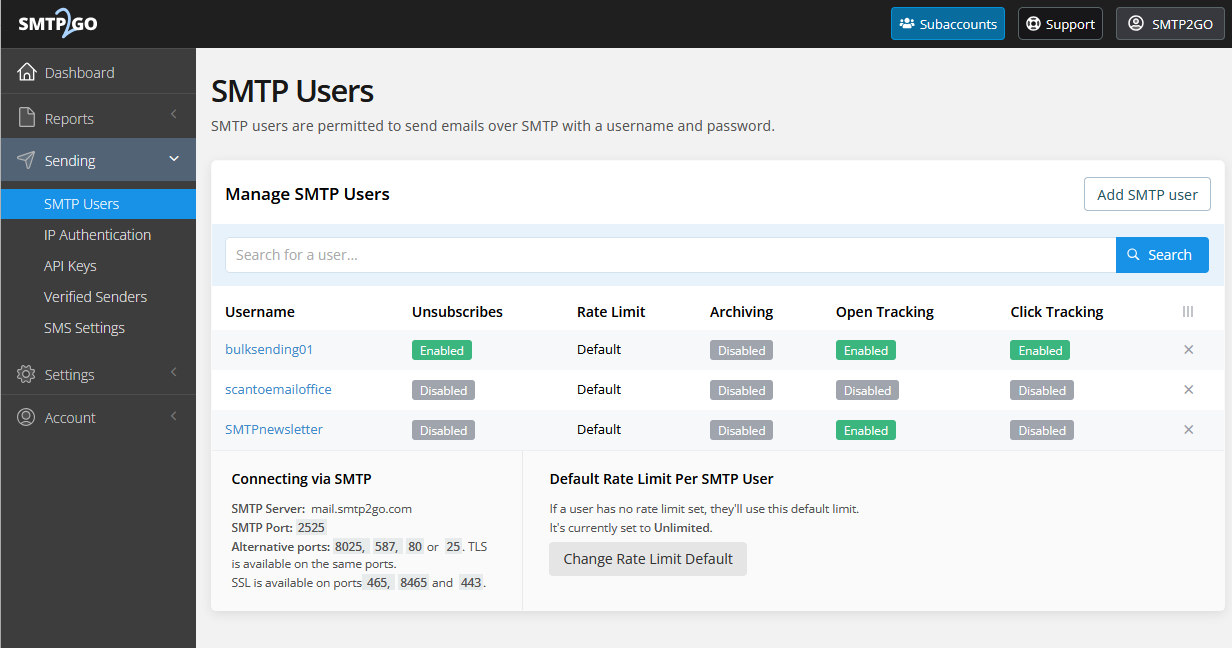
Integration requires two steps: verify your sending domain and create an SMTP user for authentication. Then replace your existing outgoing server settings with mail.smtp2go.com. SMTP2GO handles authentication, TLS encryption, reputation management, and final delivery from there.
Source: SMTP2GO
The relay supports eight ports (25, 80, 587, 2525, 8025, 443, 465, 8465), which solves a practical problem: corporate firewalls and hotel networks frequently block standard SMTP ports. Alternatives on ports 80 and 443 mean email can get through even in restrictive network environments.
Performance limits are generous: 200,000 emails per hour, 40 simultaneous connections, up to 5,000 emails per connection, and a 50 MB maximum message size. Geographic routing via custom DNS resolution connects senders to their nearest inbound server (Los Angeles, Fremont, Seattle, Newark, Frankfurt, London, Singapore, or Sydney), reducing connection latency.
For organizations with data residency requirements, location-specific server hostnames are available: mail-us.smtp2go.com, mail-eu.smtp2go.com, mail-eu2.smtp2go.com, and mail-au.smtp2go.com.
Email API: A RESTful interface built for minimal developer effort.
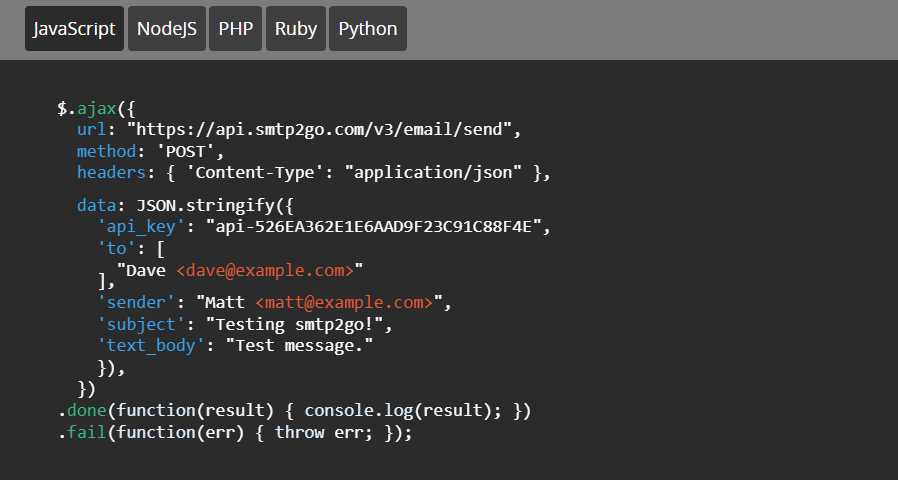
The SMTP2GO Email API provides an HTTP alternative to SMTP relay. Developers send a JSON payload to https://api.smtp2go.com/v3/email/send with just three required fields: sender, recipient(s), and subject. SMTP2GO describes its API as designed for “the minimum of mental effort” from developers.
Source: SMTP2GO
The API goes beyond sending. It exposes full account management: domain verification, SMTP user provisioning, subaccount creation, suppression lists, IP allowlisting, and webhook configuration. SaaS platforms and agencies can automate customer onboarding workflows programmatically.
SMTP2GO maintains nine official client libraries covering .NET, Go, Python, Node.js, PHP, Ruby/Rails, Rust, Django, and WordPress. Including Rust and Django as dedicated integrations goes beyond what most competitors offer.
The API and SMTP relay operate under the same account with unified credentials, so reporting, bounce tracking, and webhooks work identically regardless of integration method. Per-API-key rate limits with automatic team notifications help multi-developer environments prevent accidental overuse.
Reporting & Analytics: Real-time visibility into every email’s delivery lifecycle.
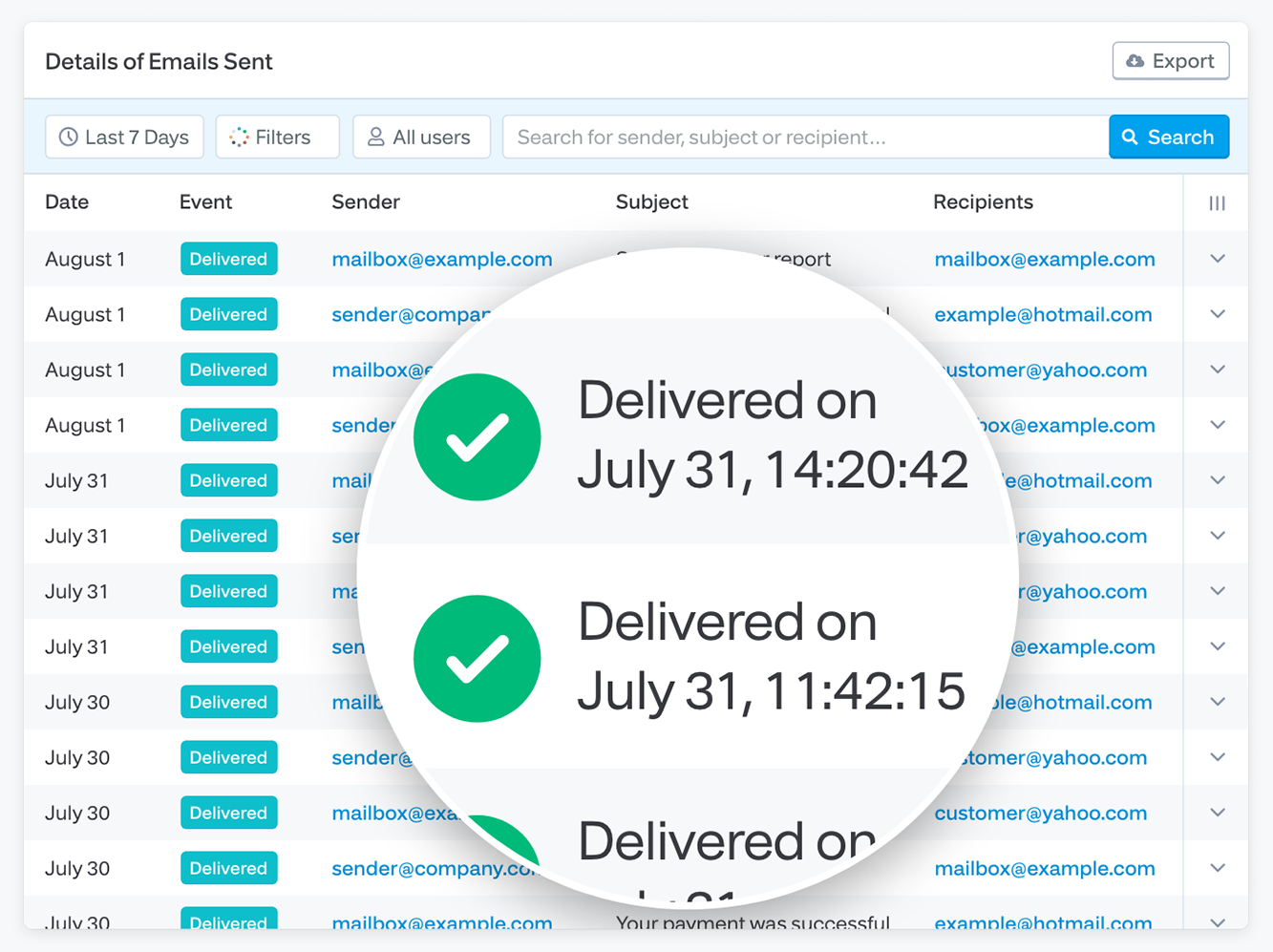
SMTP2GO’s reporting tracks every email from initial processing through final disposition. The activity log captures delivered, soft-bounced, hard-bounced, rejected, spam-reported, unsubscribed, opened, and clicked events. The platform describes this as tracking emails right to the final destination, just like tracking a parcel.
Source: SMTP2GO
The dashboard displays bounce rate as a 30-day rolling percentage with graded thresholds: 0-5% Good, 5-10% Fair, above 10% Poor. Spam rates follow a tighter scale: 0-0.05% Good, 0.05-0.10% Fair, above 0.10% Poor. When metrics cross problem thresholds, automated alerts notify account holders.
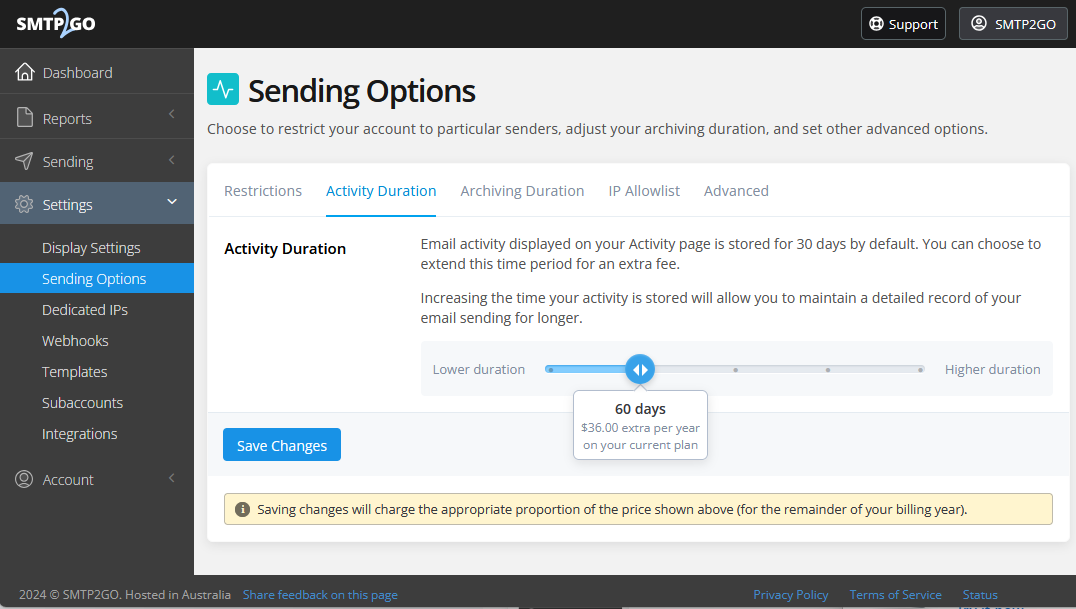
The /activity/search API endpoint mirrors the dashboard for programmatic access, accepting 14 search parameters including date ranges, sender, recipient, subject, and event type. Data retention defaults to 5 days on the free plan and 30 days on paid plans. The Activity Duration add-on extends this to 60 days, 120 days, 1 year, or 2 years for compliance use cases.
Source: SMTP2GO
Deliverability Tools: Authentication, monitoring, and testing handled automatically.
SMTP2GO handles SPF and DKIM automatically for every verified sender domain on all plans, including the free tier. Domain setup requires adding three CNAME records. These can be configured manually or through the Entri integration (launched January 2026), which logs into the sender’s DNS provider to add records without storing credentials.
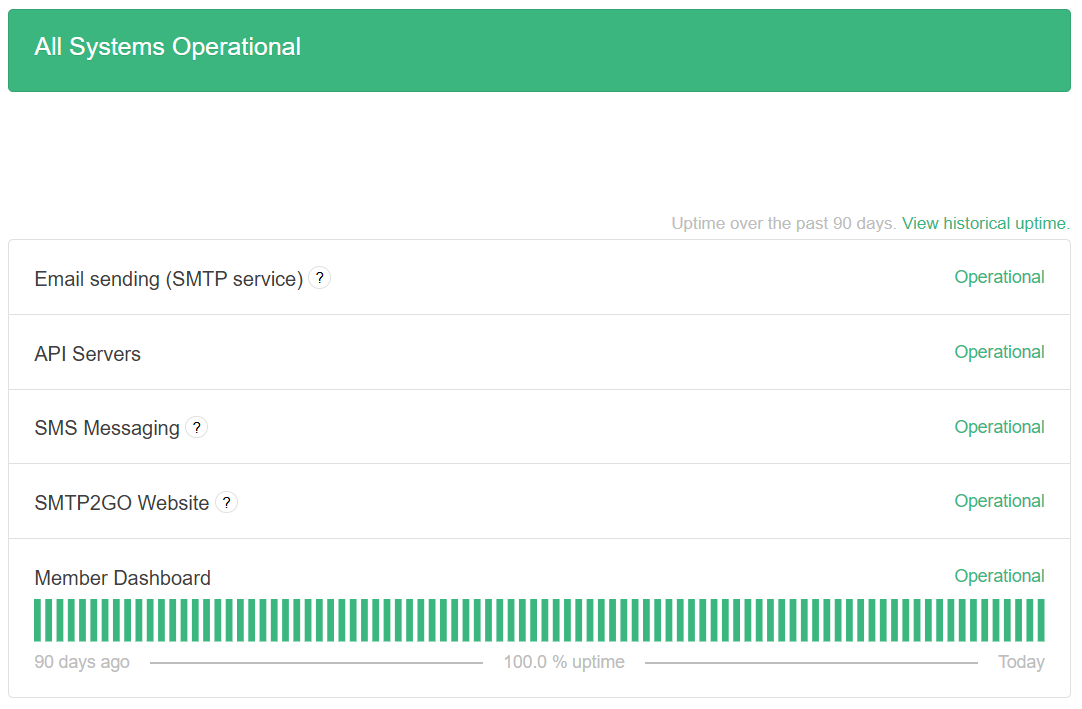
The platform maintains feedback loop relationships with Outlook, AOL, Hotmail, and Yahoo, tracking spam complaints in real time. IP blacklist monitoring and spamtrap detection run as background processes on all plans. A public status page provides minute-by-minute uptime data.
Source: SMTP2GO
On the Professional plan and above, senders can test emails against major spam filters and preview rendering across 40+ email clients before sending. This catches formatting issues and content flags before they reach real inboxes.
MSP & Subaccount Management: Built for IT providers managing email across multiple client organizations.
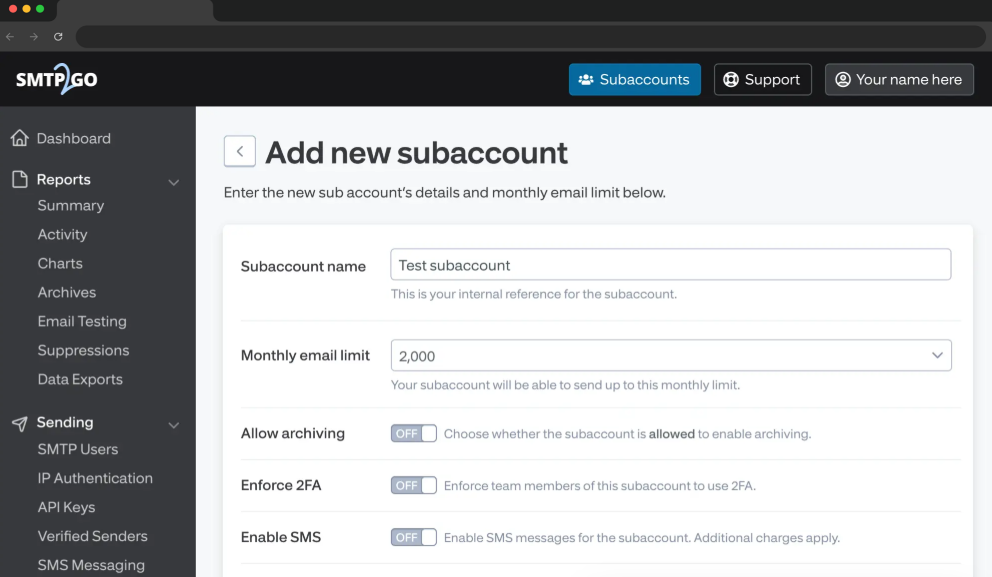
SMTP2GO’s MSP infrastructure lets managed service providers provision and manage email delivery for their entire client base from a single account. Subaccounts are unlimited with no per-user fee. Each subaccount gets independent controls for email limits, archiving, two-factor authentication enforcement, SMS capabilities, and dedicated IP assignment.
Source: SMTP2GO
A one-click hot-swap login lets MSP administrators move between client accounts without logging out. The program includes up to 20% reseller discount and a cPanel/WHM plugin for hosting providers managing hundreds of customer domains.
Pricing: Transparent volume-based tiers with a permanent free plan.
SMTP2GO uses flat-rate monthly pricing based on email volume, with no per-seat charges. Multiple admin logins and SMTP users are included on every plan at no extra cost.
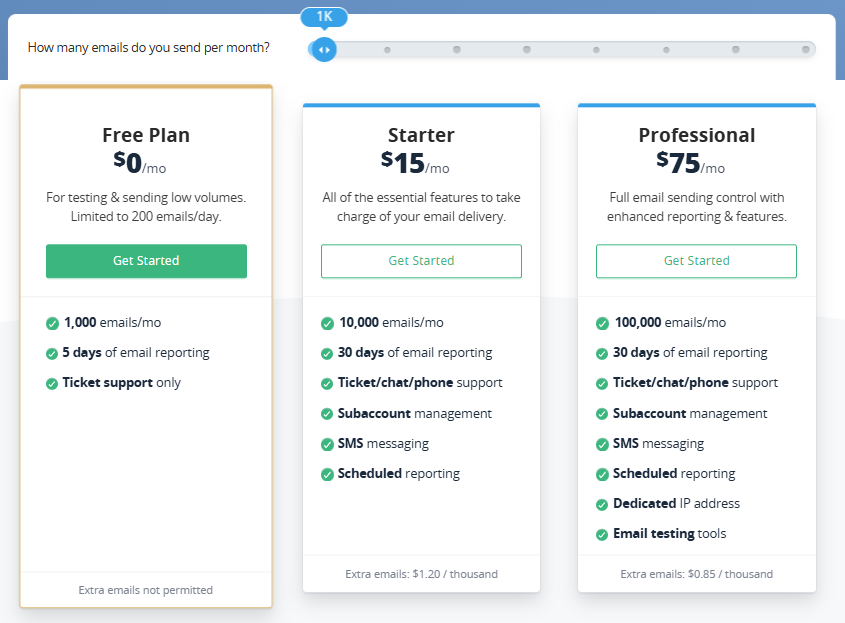
Free Plan ($0/month):
- 1,000 emails/month; 200/day cap; 25/hour until domain is verified
- 5 days reporting history
- Ticket support only (live chat and phone for first 14 days)
- Automatic DKIM/SPF, blacklist monitoring, spamtrap detection included
Starter Plan ($15/month or $150/year):
- 10,000 emails/month; 30 days reporting
- Full support (ticket, live chat, phone)
- Subaccounts, SMS messaging, scheduled reporting
- Overage: $1.20 per 1,000 extra emails
Professional Plan ($75/month or $750/year):
- 100,000 emails/month; 30 days reporting
- Dedicated IP address (auto-assigned at this volume)
- Email testing tools (spam filter testing, 40+ client previews)
- Overage: $0.85 per 1,000 extra emails
Higher-volume plans are available for 250K, 500K, 1M, and 3M+ emails/month. Annual billing saves the equivalent of two months’ cost. A 30-day money-back guarantee applies to all paid plans, and a 100% uptime SLA provides 5% monthly fee credit for every 30 minutes of unscheduled downtime.
Where SMTP2GO Falls Short
SMTP2GO excels at transactional email delivery. But several limitations surface for businesses whose email needs extend beyond infrastructure.
No Marketing Email Capabilities: SMTP2GO provides no template editor, list management, subscriber segmentation, campaign scheduling, A/B testing, or automation workflows. It is a relay, not an email service provider. Any team that needs to send marketing campaigns, run nurture sequences, or manage subscriber lists must pair SMTP2GO with a separate platform. That means two vendors, two billing relationships, and two sets of deliverability metrics for what is one communication channel.
Short Data Retention on Lower Plans: The free plan retains only 5 days of reporting; Starter provides 30 days. Users on Capterra note being unable to “access data after a small window of time.” Extended retention (up to 2 years) requires a paid add-on, adding cost for compliance-sensitive organizations that need audit trails.
Compliance Throttling Can Disrupt Urgent Sends: SMTP2GO monitors sending patterns and intervenes when activity looks suspicious. One legal services CEO reports on Capterra that “without warning, the system throttles the send, leading to costly delays in sending out time-sensitive legal notices.” This protects shared IP reputation but creates friction for senders with urgent, high-volume delivery needs.
No Inbound Email Parsing: G2 reviewers identify the missing inbound parser as a gap. SMTP2GO is a pure outbound relay. Bidirectional email workflows (parsing incoming replies for support automation, for example) require a separate service.
Volume Pricing at Scale: G2 reviewers note pricing “can be higher than some competitors, particularly for businesses that require high-volume email sending.” At 1M+ emails/month, AWS SES at $0.10 per thousand costs less per email, though without SMTP2GO’s managed support and monitoring.
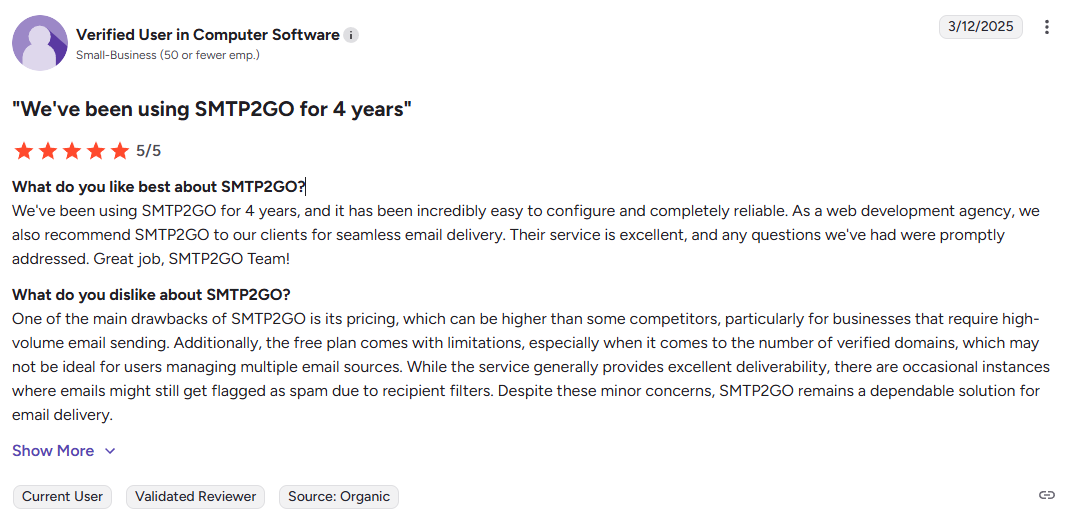
Source: G2
Email Testing Limited to Professional Tier: Pre-send spam filter testing and email client previews are only available on the $75/month Professional plan and above. Starter plan users sending 10,000 emails/month have no built-in way to test how their emails will render or score before sending.
These limitations follow from SMTP2GO’s focus on delivery infrastructure over marketing functionality. But for businesses that need both reliable delivery and the ability to build and manage email campaigns, they create a clear gap.
Top SMTP2GO Alternative for Email Marketing + Delivery: Emercury
Emercury addresses SMTP2GO’s limitations by providing a dedicated SMTP Relay for transactional email alongside a full Marketing Manager product for campaigns, automation, and list management. Founded in 2002 (four years before SMTP2GO) and serving 10,000+ marketers and businesses, Emercury is an email marketing platform built for businesses that prioritize deliverability and measurable results, particularly those operating in verticals that mainstream ESPs restrict.
SMTP Relay: A developer-friendly transactional email service that competes directly with SMTP2GO’s core product.
Emercury’s SMTP Relay handles the same transactional use cases as SMTP2GO: password resets, account registration confirmations, order and shipping confirmations, payment reminders, welcome and onboarding emails, webinar submission replies, and form submission responses. It supports standard SMTP plus API integration with PHP, Python, cURL, JSON, Ruby, C#, and Java, making it practical for coding transactional emails into SaaS products, e-commerce platforms, travel applications, and education systems.
Multi-domain support from a single account means developers building SaaS platforms that generate multiple transactional emails per user (verification, payment reminders, account management) can manage everything from one dashboard. The relay infrastructure keeps your application’s email flowing without requiring a dedicated email operations team.
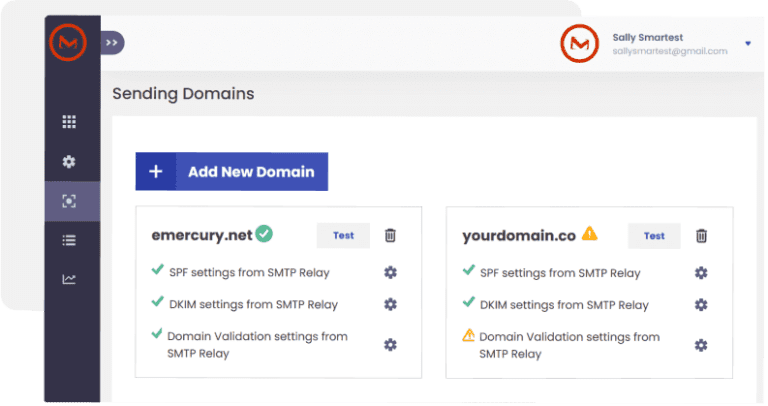
The SMTP Relay includes its own free tier: 3,000 total emails or 100 emails per day, giving developers a starting point to test and integrate before committing to a paid plan. Acceptance criteria are straightforward compared to providers like AWS SES; developers don’t need to be registered entities or meet specific sending thresholds to get access.
One key distinction: Emercury maintains strict separation between its two products. The SMTP Relay is exclusively for transactional emails. Marketing emails cannot be sent through the relay, and doing so violates Emercury’s terms. This separation protects relay IP reputation and ensures transactional emails maintain high deliverability without being affected by marketing sending patterns.
Emercury also commits to no surprise shutdowns on the SMTP Relay. As long as customers have consent from recipients and comply with the terms and conditions, accounts remain active. This contrasts with providers where compliance throttling can delay time-sensitive sends without warning, as some SMTP2GO users have reported.
Marketing Manager: The product layer that SMTP2GO doesn’t offer.
Where SMTP2GO stops at delivery infrastructure, Emercury’s Marketing Manager adds Broadcast Campaigns, Autoresponders, and the Journey Builder for multi-step automated sequences. A single vendor handles password reset emails, order confirmations, welcome sequences, promotional broadcasts, and re-engagement campaigns, with unified deliverability management across both transactional and marketing sending.
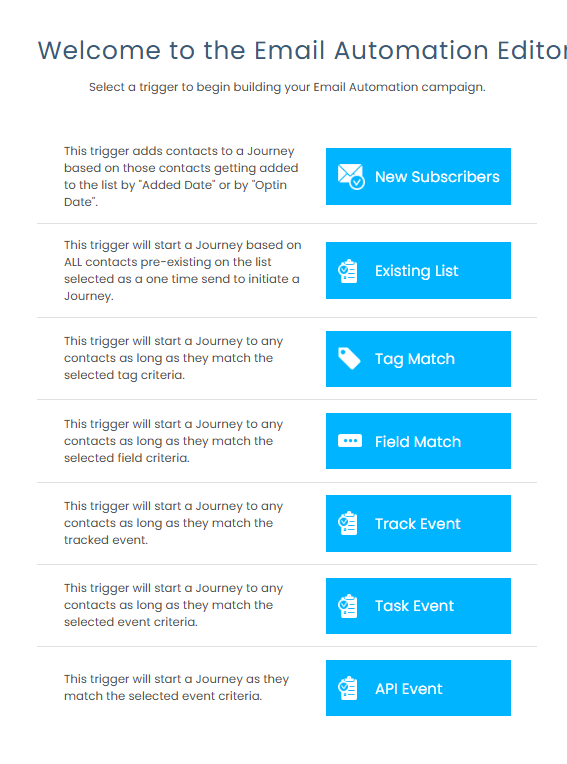
The Journey Builder lets marketers design branching workflows with seven trigger types: new subscriber, existing list, tag match, field match, tracked event, task event, and API-fired event. Workflows support IF/THEN conditions based on clicks and opens, wait steps with day-of-week and time-window controls, holiday exclusions, and in-flow tag and list management.
The Drip feature caps daily automation sends (for example, 100 per day over 100 days for a 10,000-contact list) to protect deliverability during warm-up periods. Additional features include a Go To module for workflow logic and Smart Personalization for conditional content based on subscriber attributes or behaviors.
A practical example from Emercury’s documentation: a subscriber enters via a new signup trigger, receives an immediate email, then hits an IF:Clicked condition. Those who click move to a monetization list (triggering a second automation); those who don’t receive a follow-up the next day. This conversion-to-monetization workflow is built for performance marketers working with lead funnels.
Each automation step can have its own suppression list, and ECPM reporting shows revenue per subscriber per mailing, connecting automation performance directly to revenue rather than engagement metrics alone.
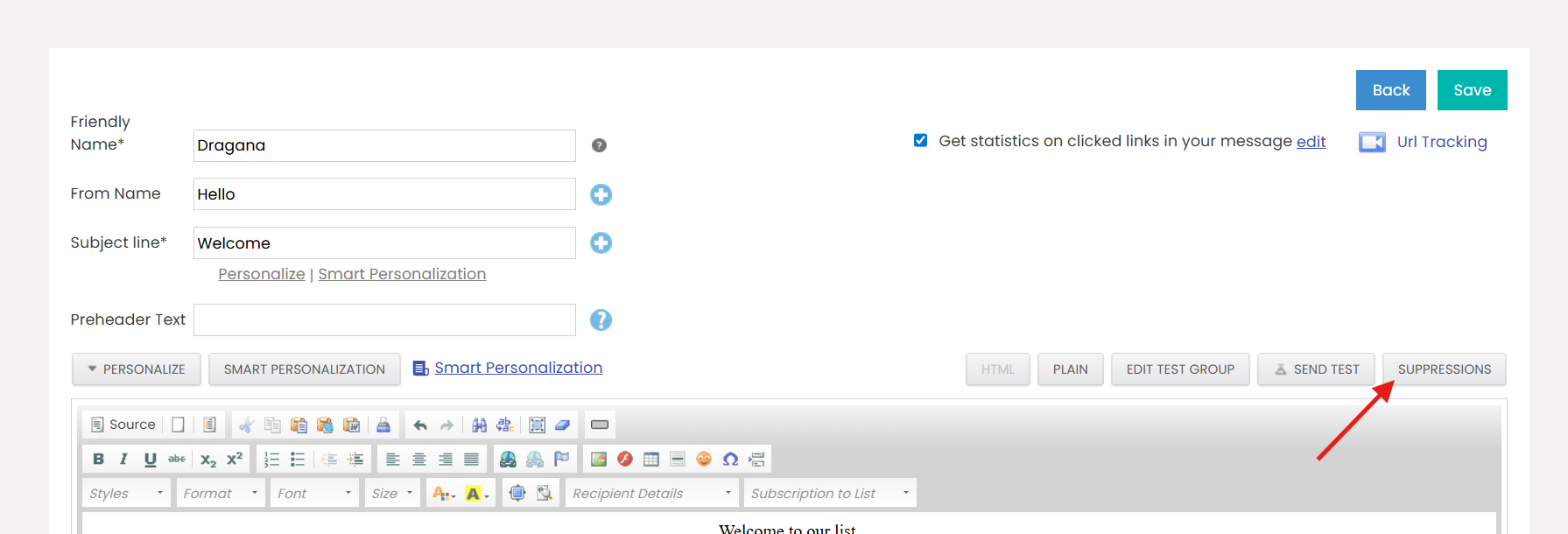
Deliverability Infrastructure with Human Expertise: In-house support on every paid tier, dedicated analysts on Pro and Scale.
SMTP2GO handles deliverability through automated monitoring and feedback loops. Emercury layers human expertise on top of its infrastructure, with support levels that scale by tier.
On Starter and Grow plans, customers get chat access to in-house customer success representatives with delivery expertise (core team members, not outsourced support). Pro and Scale plan customers are assigned a named Delivery Analyst who monitors their account: checking domain health, tracking spam complaints, identifying blacklisting issues, investigating sudden drops in delivery rates, and staying ahead of policy changes from providers like Google and Yahoo. These analysts build IP warm-up schedules based on each sender’s engagement metrics.
The platform includes a List Analysis Tool that runs verification-based checks to maintain list hygiene. It identifies bogus emails, known spam traps, and unsafe addresses that could trigger spam reports, showing clear metrics on how many emails are safe to send versus how many should be removed to protect sender reputation.
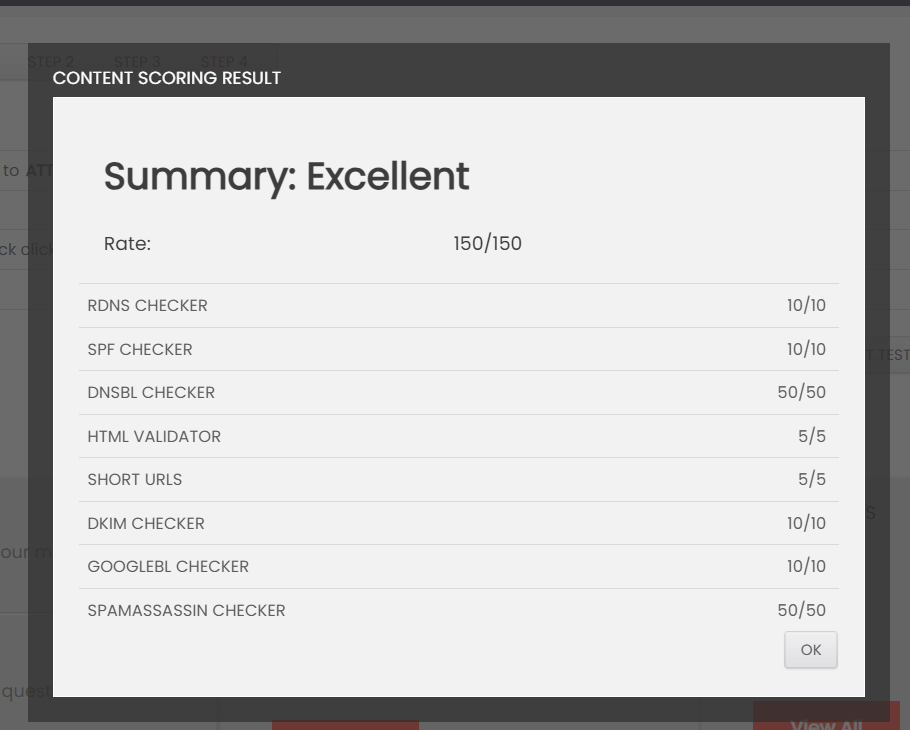
The Advanced Alerting System fires real-time alerts for URL blacklisting, deferrals, content blocking, and DKIM/SPF failures. A built-in Content Scoring Engine scans email copy with a one-click check, analyzing syntax, word choice, and spam trigger words across eight criteria (RDNS, SPF, DKIM, DNSBL, GoogleBL, SpamAssassin, HTML validity, and short URLs) and predicting whether an email will land in the inbox or spam folder. An Advanced Spam Test extends this with a proprietary 150-point scanner.
The Domain Trending Report tracks open rate trends by individual mailbox provider (Gmail, Yahoo, Outlook) over 7, 14, 30, or 90-day periods with color-coded alerts, and supports monitoring across multiple sending domains at once. This per-provider granularity helps senders diagnose inbox placement issues at the specific provider causing problems.
Emercury also offers dedicated IPs, failover IPs, and shared/hybrid IP environments on Pro and Scale plans, with warm-up schedules tailored by the delivery team rather than static volume ramp tables.
AI-Powered Content Tools: Built-in content generation for faster campaign creation.
Emercury includes AI tools that generate email copy, subject lines, and mobile-optimized images directly within the platform. These are particularly useful when setting up A/B split tests, making it practical to create and test multiple subject line or copy variations without starting each from scratch.
Advanced Segmentation: Nested condition logic, real-time smart segments, and dual-source segment building.
Where SMTP2GO offers suppression lists as its only form of audience management, Emercury’s Advanced Segment Builder supports multi-condition filtering across behavioral, demographic, tag-based, timeline, permission, and domain-group criteria. Condition groups can be nested with AND/OR logic applied both within and between groups, enabling queries like “Yahoo users who opened in 14 days OR Gmail users who opened in 30 days.”
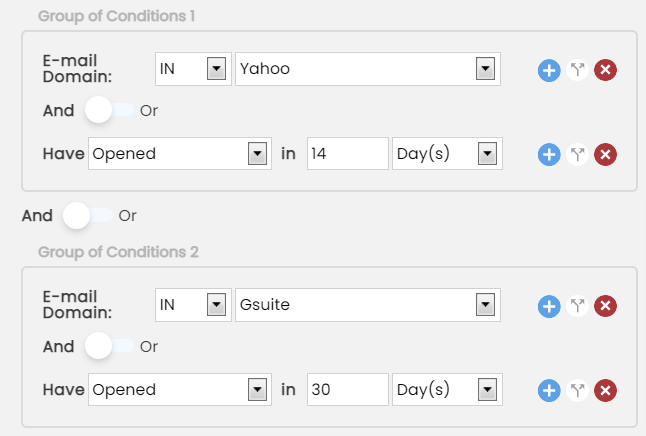
Segments can be built from subscriber lists or from campaign report data, targeting contacts who interacted with specific campaigns regardless of which list they belong to. Smart Segments update membership automatically in real time as subscriber behavior changes.
Virtual segments are temporary, inline segments created within the campaign wizard for one-off batch sends during IP warm-up. They support Start/Amount mode for daily volume incrementing and never persist in the account’s list view, keeping things clean for high-volume senders.
Pricing: Pay for emails sent, not features.
Emercury prices by sends, not features. There is no feature-gating across tiers; the same core features are accessible on every plan, with support levels as the primary differentiator.
Emercury’s Forever Free plan for Marketing Manager includes 2,000 subscribers and 12,000 emails per month with no credit card required and no expiration. It includes broadcast campaigns, one autoresponder, one email automation, and the Content Scoring Engine. The SMTP Relay offers its own free tier with 3,000 total emails or 100 emails per day.
On annual subscriptions, the paid plans start at $227/month (Grow) and scale through Pro ($687/month) and Scale ($1,167/month), with each tier adding more human support: in-house delivery guidance on Grow, dedicated Delivery Analysts and one-on-one training on Pro, and full white-glove service with dedicated IPs on Scale.
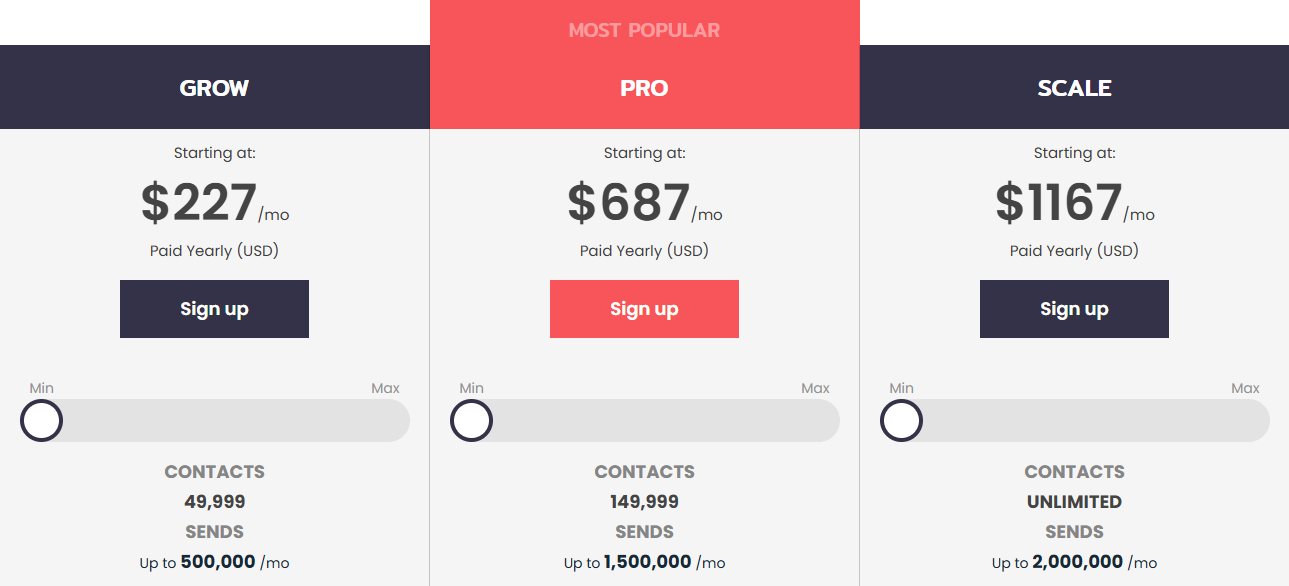
Emercury also offers a CPM-based billing model (per-send with no contact limit) alongside its subscriber-based pricing. This suits operators who import and mail fresh leads continuously, a use case that subscriber-based models punish with rapid cost growth.
Where Emercury Has Limitations
For balance, Emercury is not the strongest choice in every scenario. Its paid plans start at $227/month, a significant step up from SMTP2GO’s $15/month Starter. If you only need SMTP relay infrastructure without marketing capabilities, you’d be paying for a broader platform you may not fully use.
Emercury also offers fewer official SDK libraries than SMTP2GO’s nine, relying on XML and JSON APIs with developer documentation rather than language-specific packages. And for teams that need only high-volume transactional sending at the lowest per-email cost, a raw infrastructure provider like AWS SES will be cheaper at scale, though without Emercury’s human support layer.
SMTP2GO or Emercury: Comparison Summary
| SMTP2GO | Emercury | |
|---|---|---|
| Primary focus | SMTP relay / email delivery infrastructure | SMTP relay + full email marketing platform |
| Target users | Developers, IT admins, MSPs | Businesses prioritizing deliverability and ROI; developers (SMTP Relay), performance marketers (Marketing Manager) |
| SMTP relay | ✅ Core product | ✅ Dedicated product (PHP, Python, Ruby, C#, Java, cURL, JSON) |
| Marketing campaigns | ❌ Not available | ✅ Broadcast, autoresponder, Journey Builder |
| Email automation | ❌ Not available | ✅ Multi-step with conditional branching |
| AI content tools | ❌ Not available | ✅ Email copy, subject lines, image generation |
| Segmentation | ❌ Suppression lists only | ✅ Advanced builder with nested conditions, smart segments |
| A/B testing | ❌ Not available | ✅ Campaigns and automations |
| List hygiene tools | ❌ Not available | ✅ List Analysis Tool with spam trap detection |
| Content scoring / spam check | ✅ Professional plan only | ✅ All plans including free |
| Deliverability support | ❌ No dedicated analysts | ✅ In-house team on all paid tiers; dedicated analysts on Pro/Scale |
| Dedicated IPs | ✅ Professional plan (auto-assigned at 100K/mo) | ✅ Pro and Scale plans |
| Free plan | ✅ 1,000 emails/month, permanent | ✅ Marketing: 2,000 subs / 12K emails; Relay: 3,000 emails |
| Entry paid plan | $15/month (10K emails) | $227/month (Grow) |
| Feature-gating | Yes (testing tools on Professional+) | No (same features on all tiers, support level scales) |
| Account stability | Compliance throttling may delay sends | No surprise shutdowns with consultative approach |
| ISO 27001 | ✅ Certified | ❌ Not listed |
| SMS | ✅ Starter plan and above | ❌ Not available |
| MSP subaccounts | ✅ Unlimited, no per-user fee | ✅ Multi-account agency dashboard |
| Support | 24/7 phone, chat, ticket on paid plans | In-house chat (Grow); phone, dedicated CSM, Delivery Analyst (Pro+) |
| Uptime SLA | ✅ 100% with financial credits | ✅ Scale plan only |
| API libraries | 9 official SDKs | XML and JSON APIs with developer documentation |
| Best for | Transactional/operational email delivery | Transactional delivery + marketing email combined |
Final Verdict
The choice between SMTP2GO and Emercury depends on whether you need delivery infrastructure alone or delivery infrastructure combined with marketing capabilities.
Choose SMTP2GO if:
- You need a focused SMTP relay for transactional and operational email
- Your applications or systems send password resets, order confirmations, shipping notifications, or alerts
- You only need reliable email delivery, not marketing automation features
- You value a provider with a 20-year track record and ISO 27001 certification
- A permanent free tier fits your requirements
- 24/7 responsive support is important for your team
Get started with SMTP2GO here.
Choose Emercury if:
- You want both transactional email delivery and marketing campaigns in one platform
- You need an SMTP relay with a free tier and predictable account policies
- Your workflow includes broadcasts, automated sequences, and advanced segmentation
- You value built-in AI content tools and hands-on deliverability support
- Email performance and revenue-per-subscriber tracking are key metrics for your business
- You prefer a single vendor instead of managing separate tools for sending and marketing
Run both transactional and marketing email from one platform with Emercury.
SMTP2GO does one thing well: get your email delivered. Emercury does that and adds the tools to decide what gets sent, to whom, and when. Your choice depends on which of those problems you still need to solve.
SMTP2GO FAQ
Is SMTP2GO free?
Yes, SMTP2GO offers a permanent free plan with 1,000 emails per month, a 200 emails per day cap, and 5 days of reporting history. It is not a time-limited trial. The free plan includes automatic DKIM and SPF, blacklist monitoring, and spamtrap detection, but limits support to ticket-only after the first 14 days. Emercury also offers permanent free tiers: 2,000 subscribers and 12,000 emails per month on Marketing Manager, plus 3,000 total emails or 100 per day on its SMTP Relay.
What happened to SendGrid’s free plan?
SendGrid retired its free plan in 2025, and SMTP2GO has positioned itself as the migration destination for displaced developers. SMTP2GO published dedicated migration content and maintains a permanent free tier as a direct alternative. Emercury’s SMTP Relay free tier and Forever Free marketing plan are additional options for teams that need transactional delivery, marketing capabilities, or both.
Does SMTP2GO offer marketing email features?
No. SMTP2GO is a dedicated SMTP relay and email delivery service. It does not include a template editor, list management, subscriber segmentation, campaign scheduling, A/B testing, or automation workflows. Teams needing marketing email capabilities must use a separate platform. Emercury provides both an SMTP Relay for transactional email and a Marketing Manager with broadcast campaigns, a Journey Builder for multi-step automation, autoresponders, AI content tools, and advanced segmentation.
How does SMTP2GO handle deliverability?
SMTP2GO manages DKIM and SPF automatically for verified sender domains, maintains feedback loop relationships with major mailbox providers, monitors IP blacklists continuously, and runs spamtrap detection on all plans. Dedicated IPs are auto-assigned at the Professional plan level (100,000 emails per month). The platform also offers a 100% uptime SLA with financial credits on paid plans. Emercury adds in-house customer success representatives with delivery expertise on all paid tiers, with dedicated Delivery Analysts on Pro and Scale plans who build warm-up schedules, monitor domain health, and manage sender reputation.
What support does SMTP2GO provide?
SMTP2GO offers 24/7 support via phone, live chat, and ticket on all paid plans, with staff across the USA, UK, Spain, Australia, and New Zealand. The team holds a Stevie Award for support quality, and live chat carries an advertised average response time under 10 minutes. The free plan receives ticket-only support after the first 14 days.
Can SMTP2GO send SMS messages?
Yes, SMTP2GO includes SMS messaging on Starter plans and above via email-to-SMS or the API. Dedicated SMS sender numbers are available for purchase. However, SMS features are not extensively documented compared to the email delivery core, and international coverage details are limited in public documentation.
Does SMTP2GO work with printers, scanners, and IoT devices?
Yes. Any device that supports configuring an outgoing SMTP server can use SMTP2GO. The platform publishes setup guides for printers from Ricoh, Lexmark, Kyocera, and Xerox, among others. Stored Technology Solutions, a customer since 2011, uses SMTP2GO to relay email from phone systems, copiers, and printers. The multi-port support (including ports 80 and 443) is particularly useful for devices on restrictive networks.
How does SMTP2GO pricing compare to AWS SES for high-volume sending?
SMTP2GO’s volume pricing includes managed deliverability, 24/7 support, and monitoring tools in the monthly fee. AWS SES charges approximately $0.10 per 1,000 emails with no included support or monitoring. At lower volumes, SMTP2GO’s bundled approach is simpler. At 1 million emails per month and above, AWS SES costs less per email but requires teams to manage deliverability, monitoring, and bounce handling on their own.